
Tip of the Week: Making Your Videos Clickable with Chaptering
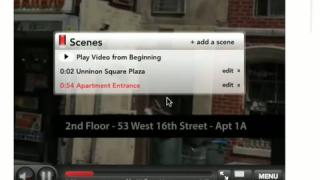
This week we're going to talk about how you can power your videos with WellcomeMat's video chaptering. Chapters are here for you to highlight and bring attention to specific sections of your video.
In this example, pretend you are an event planner. While you can choose to watch the entire video by selecting the 'PLAY' button, maybe you're more interested in renting this space for a 'Private Event'. Simply rollover and click the 'Private Events' scene and jump right to this portion of the video. In this case, the owner of this video decided to add scenes for each section of the tour. If this was a property video, you might choose to highlight the bedroom, kitchen, backyard, etc.
In this example, pretend you are an event planner. While you can choose to watch the entire video by selecting the 'PLAY' button, maybe you're more interested in renting this space for a 'Private Event'. Simply rollover and click the 'Private Events' scene and jump right to this portion of the video. In this case, the owner of this video decided to add scenes for each section of the tour. If this was a property video, you might choose to highlight the bedroom, kitchen, backyard, etc.
Powered by
WellcomeMat